PostgreSQL is known for being reliable, but keeping it highly available in production is a different story. A single primary node can become a single point of failure, and manual failover is never fun, especially at 2 a.m.
Patroni helps solve this by managing PostgreSQL clusters with automatic failover, leader election, and replication, backed by a distributed configuration store like etcd. The result is a database cluster that can survive node failures without manual intervention.
In this article, we’ll walk through a simple, practical setup of an HA PostgreSQL cluster using Patroni, focusing on concepts and configuration you can actually use in real environments.
Why Patroni?
There are several ways to build an HA setup for PostgreSQL, but Patroni stands out for one simple reason: it’s designed specifically for PostgreSQL failover.
Unlike custom scripts or ad-hoc solutions, Patroni provides a battle-tested framework for leader election, replication management, and automatic failover. It understands PostgreSQL internals — promotion, timelines, replication slots and handles them safely.
Another key advantage is its distributed consensus model. By using etcd (or Consul/ZooKeeper) as a single source of truth, Patroni avoids split-brain scenarios and makes failover decisions predictable and consistent.
In short, Patroni reduces operational complexity. Instead of building and maintaining your own HA logic, you let Patroni handle the hard parts—so you can focus on running PostgreSQL.
High-Level Architecture
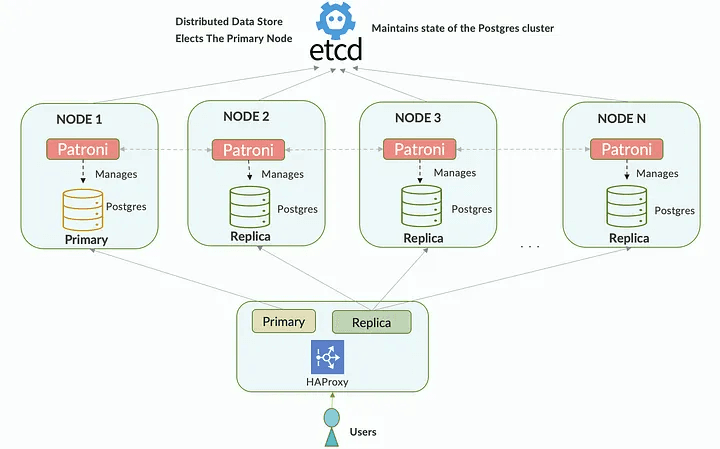
Core Components
-
PostgreSQL
Each node runs a PostgreSQL instance. At any given time, one node acts as the primary, while the others run as replicas using streaming replication.
-
Patroni
Patroni is the brain of the cluster. It manages PostgreSQL startup, handles leader election, monitors node health, and performs automatic failover when the primary becomes unavailable.
-
Distributed Configuration Store (etcd)
Patroni relies on etcd as a shared consensus layer. Cluster state, leader information, and locks are stored here to prevent split-brain scenarios.
-
Load Balancer (Optional but Recommended)
Tools like HAProxy or PgBouncer sit in front of the cluster and provide a single endpoint for applications, routing traffic to the current primary or replicas as needed.
Architecture Flow
- All Patroni nodes connect to the same etcd cluster.
- Patroni performs leader election using etcd.
- The elected leader promotes its PostgreSQL instance to primary.
- Other nodes automatically follow the leader as replicas.
- If the primary fails, Patroni triggers an automatic failover and promotes a healthy replica.
Prerequisites & Environment
Before setting up the cluster, make sure the environment is prepared properly. A clean and consistent setup will save you from many subtle issues later.
Node Topology
In this setup, we’ll use:
- 3 nodes running:
- PostgreSQL
- Patroni
- etcd
- 1 node running:
- HAProxy
All nodes should use the same OS version: Ubuntu 24.04
This topology provides quorum for etcd, avoids split-brain scenarios, and ensures the PostgreSQL cluster remains available when a node fails.
Time Synchronization
- Enable NTP on all nodes
- Time drift can cause leader election and failover issues
timedatectl set-ntp on
Hostname & DNS
- Each node must have a unique hostname
- Hostnames should resolve correctly between nodes
- We can use
/etc/hosts
Example:
pg-1
pg-2
pg-3
haproxy
Using TLS Certificates for etcd and PostgreSQL (Recommended for Production)
Running a Patroni cluster without encryption means cluster metadata, leader election traffic, credentials, and database data are transmitted in plain text. In production environments, both etcd and PostgreSQL must be secured with TLS to protect the control plane and data plane.
Patroni fully supports TLS-secured connections for:
- etcd (Distributed Configuration Store)
- PostgreSQL client and replication traffic
These layers are configured independently and serve different roles.
TLS Scope in a Patroni Cluster
A Patroni-based HA setup contains two separate TLS layers:
- etcd TLS: Protects cluster state, leader election, and locks
- PostgreSQL TLS: Protects database access and replication traffic
Create Certificate Authority (CA)
Run once (on any secure node):
mkdir -p ~/etcd-certs &&cd ~/etcd-certs

openssl genrsa -out ca.key 4096
openssl req -x509 -new -nodes -key ca.key \
  -subj "/CN=etcd-ca" \
  -days 3650 -out ca.crt
Generate etcd Server Certificates
Example for pg-1:
openssl req -new -newkey rsa:4096 -nodes \
  -keyout pg-1.key \
  -subj "/CN=pg-1" \
  -out pg-1.csr

openssl req -new -newkey rsa:4096 -nodes \
  -keyout pg-2.key \
  -subj "/CN=pg-2" \
  -out pg-2.csr

openssl req -new -newkey rsa:4096 -nodes \
  -keyout pg-3.key \
  -subj "/CN=pg-3" \
  -out pg-3.csr
Sign certificate with SANs:
openssl x509 -req -in pg-1.csr \
  -CA ca.crt -CAkey ca.key -CAcreateserial \
  -out pg-1.crt -days 365 \
  -extfile <(printf "subjectAltName=DNS:pg-1,IP:192.168.122.48,IP:127.0.0.1\nextendedKeyUsage=serverAuth,clientAuth")

openssl x509 -req -in pg-2.csr \
  -CA ca.crt -CAkey ca.key -CAcreateserial \
  -out pg-2.crt -days 365 \
  -extfile <(printf "subjectAltName=DNS:pg-2,IP:192.168.122.24,IP:127.0.0.1\nextendedKeyUsage=serverAuth,clientAuth")

openssl x509 -req -in pg-3.csr \
  -CA ca.crt -CAkey ca.key -CAcreateserial \
  -out pg-3.crt -days 365 \
  -extfile <(printf "subjectAltName=DNS:pg-3,IP:192.168.122.65,IP:127.0.0.1\nextendedKeyUsage=serverAuth,clientAuth")
Generate Client Certificate (for Patroni)
openssl req -new -newkey rsa:4096 -nodes \
  -keyout patroni.key \
  -subj "/CN=patroni" \
  -out patroni.csr

openssl x509 -req -in patroni.csr \
  -CA ca.crt -CAkey ca.key -CAcreateserial \
  -out patroni.crt -days 365
Install Certificates on Nodes
Use any file transfer tool like scp to distribute certificate
# etcd
mkdir -p /etc/etcd/ssl
cp ca.crt pg-1.crt pg-1.key /etc/etcd/ssl
sudo chown etcd:etcd /etc/etcd/ssl/pg-*.key

# patroni
cp patroni.* pg:/etc/etcd/ssl/
chown postgres:postgres /etc/etcd/ssl/patroni.*

# postgresql

cp ca.crt /etc/postgresql/ssl/ca.crt
cp pg-1.crt /etc/postgresql/ssl/server.crt
cp pg-1.key /etc/postgresql/ssl/server.key


chmod 600 /etc/etcd/ssl/*.key
Adjust filenames per node.
Install & Setup ETCD
Install etcd
On each PostgreSQL node, install etcd:
apt update -y
apt install etcd-server etcd-client
Verify installation
etcd --version
etcdctl version
Configure etcd
Example /etc/default/etcd:
DAEMON_ARGS="\
--listen-peer-urls https://192.168.122.24:2380 \
--initial-advertise-peer-urls https://192.168.122.24:2380 \
--listen-client-urls https://192.168.122.24:2379,https://127.0.0.1:2379 \
--advertise-client-urls https://192.168.122.24:2379 \
--initial-cluster pg-1=https://192.168.122.24:2380,pg-2=https://192.168.122.24:2380,pg-3=https://192.168.122.50:2380 \
--initial-cluster-state new \
--initial-cluster-token patroni-etcd \
--client-cert-auth \
--trusted-ca-file /etc/etcd/ssl/ca.crt \
--cert-file /etc/etcd/ssl/pg-2.crt \
--key-file /etc/etcd/ssl/pg-2.key \
--peer-client-cert-auth \
--peer-trusted-ca-file /etc/etcd/ssl/ca.crt \
--peer-cert-file /etc/etcd/ssl/pg-2.crt \
--peer-key-file /etc/etcd/ssl/pg-2.key"
Restart etcd:
sudo systemctl restart etcd
Verify etcd cluster with TLS
ETCDCTL_API=3 etcdctl \
  --endpoints=https://192.168.122.48:2379,https://192.168.122.24:2379,https://192.168.122.65:2379 \
  --cacert=/etc/etcd/ssl/ca.crt \
  --cert=/etc/etcd/ssl/patroni.crt \
  --key=/etc/etcd/ssl/patroni.key \
  endpoint status -w table
Install PostgreSQL & Patroni
The following steps must be executed on all PostgreSQL nodes: pg-1, pg-2, and pg-3.
Install PostgreSQL
Example using latest PostgreSQL (16):
apt update
apt install -y postgresql postgresql-client
Verify:
psql --version
Stop and disable the default PostgreSQL service:
systemctl stop postgresql
systemctl disable postgresql
Patroni will manage PostgreSQL lifecycle.
Install Patroni
Install dependencies
sudo apt install -y python3-etcd3
Install Patroni with etcd support
sudo apt install -y patroni
Verify:
patroni --version
patronictl version
Patroni Configuration
Prepare Directories
sudo mkdir -p /etc/patroni
sudo mkdir -p /var/lib/postgresql/patroni
sudo chown -R postgres:postgres /var/lib/postgresql
Create Patroni config
Create /etc/patroni/patroni.yml
Example for pg-1:
scope: postgres-ha
namespace: /db/

name: pg-1

restapi:
  listen: 192.168.122.48:8008
  connect_address: 192.168.122.48:8008

etcd3:
  protocol: https
  hosts:
    - 192.168.122.48:2379
    - 192.168.122.24:2379
    - 192.168.122.65:2379
  cacert: /etc/etcd/ssl/ca.crt
  cert: /etc/etcd/ssl/patroni.crt
  key: /etc/etcd/ssl/patroni.key

bootstrap:
  dcs:
    ttl: 30
    loop_wait: 10
    retry_timeout: 10
    maximum_lag_on_failover: 1048576
    postgresql:
      use_pg_rewind: true
      parameters:
        wal_level: replica
        hot_standby: "on"
        max_wal_senders: 10
        max_replication_slots: 10
        wal_keep_size: 256MB
  pg_hba:
    - local   all             all                                   peer
    - hostssl    all             postgres        127.0.0.1/32       trust
    - hostssl    all             postgres        192.168.122.48/32  trust
    - hostssl    all             postgres        192.168.122.24/32  trust
    - hostssl    all             postgres        192.168.122.65/32  trust
    - hostssl    replication     replicator      192.168.122.0/24   scram-sha-256
    - hostssl    all     all      192.168.122.66/32   scram-sha-256

  initdb:
    - encoding: UTF8
    - data-checksums

  users:
    replicator:
      password: STRONG_PASSWORD
      options:
        - replication

postgresql:
  listen: 192.168.122.48:5432
  connect_address: 192.168.122.48:5432
  data_dir: /var/lib/postgresql/patroni
  bin_dir: /usr/lib/postgresql/16/bin
  authentication:
    replication:
      username: replicator
      password: STRONG_PASSWORD
  parameters:
    ssl: "on"
    ssl_cert_file: "/etc/postgresql/ssl/server.crt"
    ssl_key_file: "/etc/postgresql/ssl/server.key"
    ssl_ca_file: "/etc/postgresql/ssl/ca.crt"
    ssl_min_protocol_version: "TLSv1.2"
    unix_socket_directories: "/var/run/postgresql"
  pg_hba:
    - local      all             all                                peer
    - hostssl    all             all             127.0.0.1/32       trust
    - hostssl    all             postgres        192.168.122.48/32  trust
    - hostssl    all             postgres        192.168.122.24/32  trust
    - hostssl    all             postgres        192.168.122.65/32  trust
    - hostssl    replication     replicator      192.168.122.0/24   scram-sha-256
    - hostssl    all     all      192.168.122.66/32   scram-sha-256
Change permission:
chown postgres:postgres /etc/patroni/patroni.yml
chown 600 /etc/patroni/patroni.yml
Create systemd service for patroniL
sudo nano /etc/systemd/system/patroni.service

Description=Patroni PostgreSQL HA
After=network-online.target
Wants=network-online.target

[Service]
Type=simple
User=postgres
Group=postgres


ExecStart=/usr/bin/patroni /etc/patroni/patroni.yml
ExecReload=/bin/kill -HUP $MAINPID
KillMode=process
TimeoutStopSec=30
Restart=always
RestartSec=5

LimitNOFILE=102400

[Install]
WantedBy=multi-user.target
Start service:
systemctl daemon-reload
systemctl enable --now patroni
Watch log
journalctl -xfu patroni
Wait until you see:
Leader is pg-1
Start Patroni on pg-2 and pg-3
Run the same step on the remaining nodes:
They will automatically:
- clone data from the leader
- join as replicas
Verify cluster state
patronictl -c /etc/patroni/patroni.yml list
Expected output:
+ Cluster: postgres-ha---------+
|Member| Host| Role| State|
+--------+------+---------+---------+
| pg-1| ...| Leader|running|
| pg-2| ...| Replica|running|
| pg-3| ...| Replica|running|
Setting Up HAProxy for Patroni (Single Entry Point)
In a Patroni cluster, client applications should never connect directly to individual PostgreSQL nodes. Instead, HAProxy provides a stable endpoint and automatically routes traffic to the current leader.
HAProxy does not participate in failover. It simply:
- checks Patroni’s REST API
- detects the current primary
- forwards connections accordingly
Install HAProxy
sudo apt update
sudo apt install -y haproxy
Haproxy Configuration
Edit: /etc/haproxy/haproxy.cfg
frontend postgres_primary
    bind *:5432
    mode tcp
    default_backend postgres_primary_nodes

backend postgres_primary_nodes
    mode tcp
    option httpchk GET /leader
    http-check expect status 200

    server pg-1 192.168.122.48:5432 check port 8008
    server pg-2 192.168.122.24:5432 check port 8008
    server pg-3 192.168.122.65:5432 check port 8008
Enable and Start HAProxy
sudo systemctl enable haproxy
sudo systemctl restart haproxy
sudo systemctl status haproxy
Client Connection Examples
$ psql"host=192.168.122.66 port=5432 sslmode=require user=postgres"
Password for user postgres:
psql (16.11 (Ubuntu 16.11-0ubuntu0.24.04.1))

SSL connection (protocol: TLSv1.3, cipher: TLS_AES_256_GCM_SHA384, compression: off)
Type "help" for help.

postgres=# SHOW ssl;
 ssl
-----
 on
(1 row)
TLS is terminated at PostgreSQL, not HAProxy.
Failover Test
Stop Patroni on the leader node:
sudo systemctl stop patroni
After a few seconds, check again:
patronictl list
One replica should be promoted to Leader automatically
Additional Security Hardening
After enabling TLS for both etcd and PostgreSQL, additional system-level hardening is strongly recommended. These measures reduce the attack surface and limit the blast radius in case of a compromised node.
Network Firewall Rules
Restrict access to cluster ports so they are only reachable from trusted nodes.
Recommended ports:
| Service | Port | Access |
|---|---|---|
| PostgreSQL | 5432 | HAProxy + cluster nodes |
| HAProxy (RO) | 5433 | Application clients |
| Patroni REST API | 8008 | HAProxy + cluster nodes |
| etcd client | 2379 | Patroni nodes only |
| etcd peer | 2380 | etcd nodes only |
Example (UFW)
# Allow SSH
ufw allow ssh

# PostgreSQL (only from HAProxy and cluster)
ufw allow from 192.168.122.0/24 to any port 5432

# Patroni REST API
ufw allow from 192.168.122.0/24 to any port 8008

# etcd
ufw allow from 192.168.122.0/24 to any port 2379
ufw allow from 192.168.122.0/24 to any port 2380

# Default deny
ufw default deny incoming
ufwenable
Restrict Patroni REST API Exposure
The Patroni REST API should never be exposed publicly.
Best practices:
- Bind to private IPs only
- Restrict access using firewall rules
- Do not publish via load balancers
restapi:
listen:192.168.122.48:8008
connect_address:192.168.122.48:8008
Limit Superuser Exposure
- Patroni uses the PostgreSQL superuser internally
- Applications must use dedicated roles
- Superuser credentials should never be shared
Recommendations:
- Store Patroni passwords in environment files or secret managers
- Rotate superuser credentials after bootstrap
- Restrict superuser access via
pg_hba
File System Permissions
Ensure sensitive files are readable only by the postgres user like:
- patroni.yml
- TLS private keys
Conclusion
Building a highly available PostgreSQL cluster is not just about replication, it requires careful coordination between leader election, failover logic, networking, and security. With Patroni, etcd, and HAProxy, we can automate these responsibilities while keeping the system predictable and resilient.
In this setup, Patroni acts as the control plane, etcd ensures consistent cluster state, and HAProxy provides a stable access layer for applications. By adding TLS, SCRAM authentication, and network-level hardening, the cluster becomes suitable for real production workloads, not just lab environments.
The most important takeaway is that high availability and security must be designed together. Misplaced configuration, skipped encryption, or manual overrides can easily undermine an otherwise solid architecture. Patroni enforces structure, but understanding how each component interacts is what makes the system reliable.
With this foundation in place, you now have a PostgreSQL cluster that can:
- survive node failures
- fail over automatically
- protect data in transit
- and scale safely as workloads grow
From here, improvements such as connection pooling, multi-HAProxy setups, and automated backups can be added incrementally without redesigning the core architecture.
References
- https://patroni.readthedocs.io/en/latest/
- https://medium.com/@c.ucanefe/patroni-ha-proxy-feed1292d23f
- https://medium.com/@jramcloud1/set-up-high-availability-postgresql-cluster-using-patroni-1367c72fbedb
- https://medium.com/@kristi.anderson/whats-the-best-postgresql-high-availability-framework-paf-vs-repmgr-vs-patroni-infographic-8f11f3972ef3